ISBN Barcode Generator (Single or Bulk) - Shripada.com
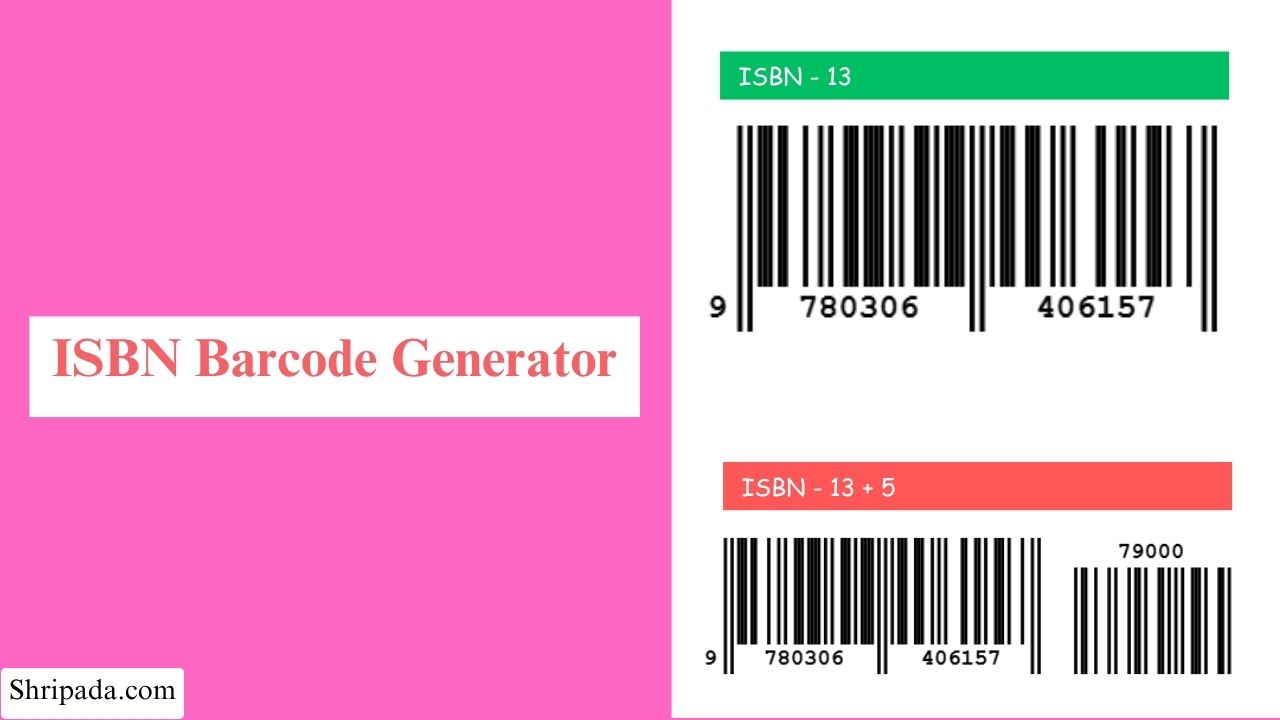
ISBN Barcode Generator Tool
What Is an ISBN Barcode?
An ISBN barcode is a barcode used to represent a book's ISBN and, in some cases, additional price information.
An ISBN barcode can have two parts:
- EAN-13: Represents the book's ISBN.
- EAN-5 add-on: Provides additional price and currency information.
The ISBN-13 comes from the book's ISBN number, while the optional 5-digit add-on can provide price and currency information.
When both are used together, they are known as an ISBN-13 + 5 barcode.
1. What Is an ISBN-13 Barcode?
An ISBN-13 is a unique 13-digit identifier assigned to a specific book edition or format.
The ISBN itself is a number. It is not the barcode. To make the ISBN scannable, it is represented as an EAN-13 barcode.
Book ISBNs normally use the 978 or 979 prefix. These prefixes are why book ISBN barcodes are commonly associated with Bookland EAN.
The ISBN-13 is used by:
- Bookstores
- Book publishers
- Book distributors
- Book libraries
- Online book retailers
- Inventory systems
2. What Is the "+5" Add-On?
The +5 refers to a smaller 5-digit barcode placed next to the main ISBN-13 barcode.
This is called an EAN-5 add-on or 5-digit add-on.
Unlike the ISBN-13, the EAN-5 add-on does not identify the book. In the book industry, it is commonly used to represent the book's price and currency information.
The EAN-5 is optional, so a book barcode can contain only the main ISBN-13 barcode or an ISBN-13 barcode together with the EAN-5 add-on.
How Does the 5-Digit Price Code Work?
The EAN-5 add-on contains five digits. Under the applicable book-industry convention, these digits can represent currency and price information.
- First digit: Currency indicator
- Last four digits: Price without the decimal point
For example: 51995
This can represent a price of $19.95 when the first digit indicates the appropriate currency under the applicable convention.
The price is not part of the ISBN. The five-digit add-on is encoded separately in the EAN-5 barcode.
Why Use an ISBN-13 + 5 Barcode Generator?
A generic barcode generator may allow you to create an EAN-13 barcode, but it may not understand the specific requirements of book barcodes.
An ISBN barcode generator designed for this purpose can handle:
- ISBN validation
- 978/979 Bookland prefix checking
- ISBN check digit calculation
- EAN-13 encoding
- EAN-5 price encoding
- EAN-5 parity calculation
- Correct placement of the price add-on
- Barcode export for printing
Key Features of ISBN Barcode Generator
1. ISBN-13 and ISBN-13 + 5 in One Tool
You can generate an ISBN-13 barcode only, or ISBN-13 barcode with an EAN-5 price add-on
You do not need a separate barcode tool for the price section.
2. Automatic ISBN Check Digit
If you enter the first 12 digits of an ISBN-13, the tool calculates the correct 13th check digit.
If you enter all 13 digits, the tool checks whether the existing check digit is valid.
3. Bookland Prefix Detection
The tool checks the ISBN prefix.
A standard ISBN-13 book barcode normally starts with 978, 979.
If the entered number does not use one of these prefixes, the tool can alert you so that you can check the number before creating the barcode.
4. Customizable Appearance
You can customize width, height, bar & background color, space between the ISBN barcode and EAN-5 add-on
5. Download or Export
You can download single EAN-13 barcode or bulk barcode in PNG, SVG, ZIP, Excel format.
Who Can Use This Tool?
1. Self-Published Authors
Independent authors can create book barcode artwork without needing specialized commercial barcode software.
2. Small Publishers
Small publishing companies can use the tool when preparing book covers and checking ISBN barcode data.
3. Printers
Printers can use it to verify ISBN and price information before a book cover goes to print.
4. Bookstores and Distributors
Bookstores and distributors can use ISBN barcodes for product identification, inventory, and internal tracking where appropriate.
How to Use the ISBN-13 + 5 Barcode Generator
1. Generate an ISBN-13 Barcode
- Enter your 13-digit ISBN.
- You can also enter the first 12 digits if you want the tool to calculate the check digit.
- The tool validates or calculates the ISBN check digit.
- It checks the Bookland prefix.
- Adjust the barcode size and colors if needed.
- Click Generate Barcode.
- Download the result as PNG or SVG.
Example (ISBN-only):
9781234567897 = ISBN-13
Generate an ISBN-13 + 5 Barcode
- Enter the ISBN digits.
- Add the 5-digit EAN-5 price code immediately after the ISBN.
- Do not add spaces between the ISBN and the 5-digit code.
- Adjust the barcode appearance if required.
- Click Generate Barcode.
- The tool creates the main ISBN barcode and the smaller EAN-5 add-on.
- Download the final barcode as PNG or SVG.
Example (ISBN + 5):
978123456789751995
9781234567897 = ISBN-13
51995 = EAN-5 price add-on
What Does the EAN-5 Price Code Mean?
The EAN-5 contains five digits.
The first digit is used as a currency indicator, while the remaining four digits represent the price without a decimal point.
Example: 51995 can represent $19.95
when 5 is the appropriate currency indicator under the relevant convention.
The important point is that the EAN-5 does not store the price in normal decimal format. The decimal point is implied.
ISBN-13 vs EAN-13
ISBN-13 and EAN-13 are related, but they are not the same thing.
ISBN-13 is a book identification number.
EAN-13 is the barcode format used to represent the ISBN in a machine-readable form. In simple terms:
- ISBN = the book's identification number
- EAN-13 = the barcode representation of that number
Do I Need a Registered ISBN?
Yes, if you are publishing a real book commercially, you generally need to obtain the appropriate ISBN through the official ISBN system or agency applicable to your country.
A barcode generator does not issue an ISBN. It only creates a machine-readable barcode from the ISBN you provide.
So you should obtain your legitimate ISBN first and then use the correct ISBN when generating the barcode.