Free Online JWT Decoder - Shripada.com
JWT Decoder Tool
Warnings
Header
Payload
Signature (base64url, as-is)
Algorithm Detected: ---
Unsigned Token (alg: none)
- This token uses the "none" algorithm, meaning it has no signature at all. Anyone can create or modify a token like this - it provides no integrity guarantee. Tokens like this should never be trusted for authentication or authorization.
Standard Claims
| Claim | Value |
|---|
What is JWT Decoder?
If you work with web development, API integration, or authentication systems, you may have seen a JWT (JSON Web Token).
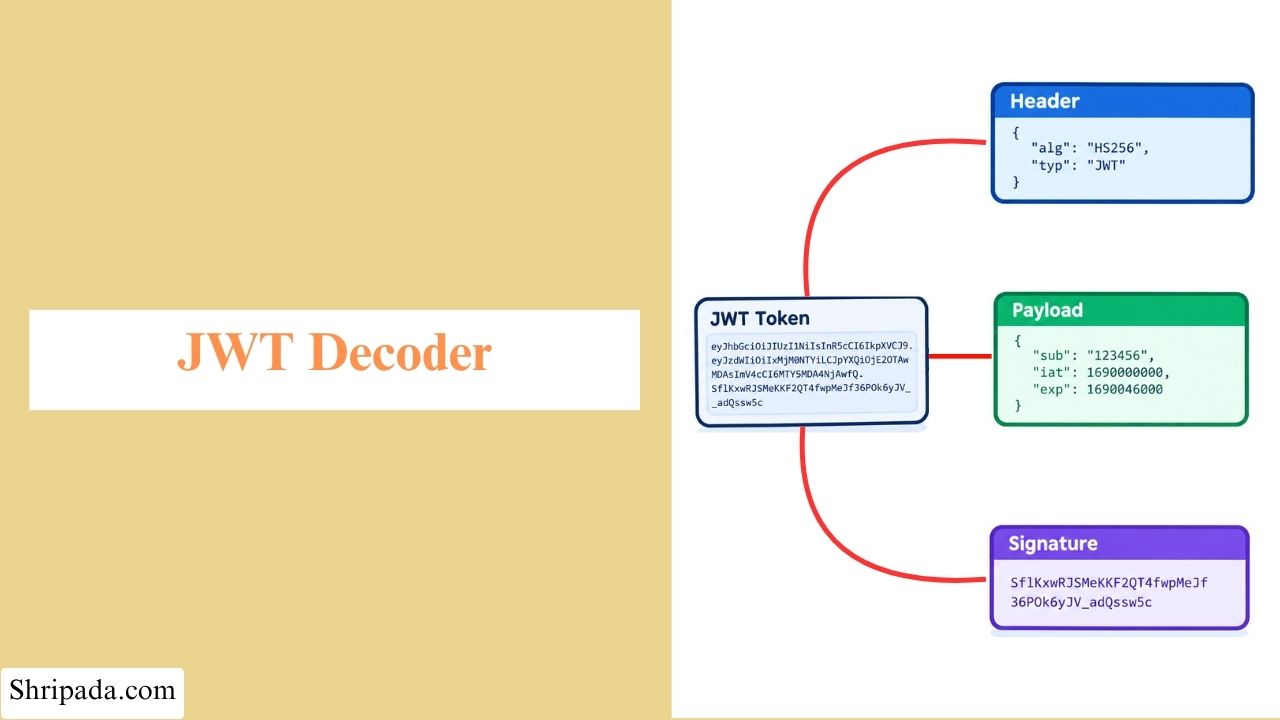
A JWT is a short string divided into three parts: Header, Payload, and Signature. Its Payload can contain information such as user identity, permissions, expiry time, and other claims.
However, it is not easy to understand this information by looking at the JWT directly. This is where a JWT Decoder is useful.
A JWT Decoder is an online tool that decodes a JWT token and displays its Header, Payload, and Signature in a readable format. It helps you understand the claims and other information stored inside the token.
Some JWT Decoder tools can also verify the token's signature to check whether the token is valid and has not been changed.
What Does a JWT Decoder Tool Do?
A JWT Decoder takes a JWT token and separates it into its three parts. This process is also known as JSON Web Token decode.
For example:
eyJhbGciOiJIUzI1NiIsInR5cCI6IkpXVCJ9.eyJzdWIiOiIxMjM0NTY3ODkwIn0.SflKxwRJSMeKKF2QT4fwpMeJf36POk6yJV_adQssw5cThe three parts are separated by dots (.):
- Header: The first part.
- Payload: The second part.
- Signature: The third part.
The Header and Payload are JSON objects encoded using Base64URL, which is a URL-safe version of Base64. When decoded, they can be displayed as plain, readable JSON.
1. Header
The Header tells you which algorithm, such as HS256, RS256, or ES256, was used to sign the token.
{
  "alg": "HS256",
  "typ": "JWT"
}
2. Payload
The Payload contains the actual claims, such as sub (subject), iss (issuer), exp (expiry time), and other custom data.
{
  "sub": "1234567890"
}
3. Signature
The Signature is the raw Base64URL signature string. It can be verified to check whether the token is valid and has not been changed.
The Signature is not a JSON object. It is a cryptographic value calculated from the Header and Payload using a secret or private key.
It cannot be decoded into readable information because it does not contain hidden data. Its purpose is to help prove the integrity of the token.
Do You Need a Secret Key to Decode a JWT?
No. You do not need a secret key to decode the Header and Payload of a JWT.
The Header and Payload are Base64URL encoded, not encrypted. This means anyone who has the JWT can decode and read these parts.
However, a secret or private key may be required to verify the Signature, depending on the signing algorithm.
For this reason, you should never store sensitive information such as passwords, credit card numbers, or other confidential data in a JWT Payload unless it is protected using an appropriate encryption method.
Key Features of the JWT Decoder
1. Instant Token Decoding
Paste your token into the tool and decode it with a single click.
The Header and Payload are displayed in a clean, readable JSON format. A copy-to-clipboard button is also available, so you can easily copy the decoded data.
2. Smart Warnings
The tool automatically checks your token for common issues, including:
- Whether the algorithm is set to none, which means the token is unsigned.
- Whether the exp claim is missing.
- Whether the token has already expired.
- Whether the nbf (Not Before) claim means the token is not valid yet.
If the tool finds any issue, it displays a clear warning in a red warning box.
3. Standard Claims Table
Common JWT claims such as iss, sub, aud, exp, nbf, iat, and jti are displayed in an organized table.
Timestamp-based claims such as exp, nbf, and iat are shown with their human-readable dates. The tool also provides easy-to-understand information such as "expires in X" or "issued X ago".
4. Signature Verification
Signature verification is one of the main features of the tool.
When you enable the Verify Signature option, the tool detects the signing algorithm used by the token.
- HMAC (HS256, HS384, HS512): Enter the shared secret key to verify the signature.
- RSA/ECDSA (RS256, ES256, etc.): Enter the public key in PEM format to verify the signature.
- Algorithm none: The tool clearly warns that the token is unsigned and should not be trusted.
Signature verification is performed completely in your browser using the Web Crypto API. Your token and secret key are processed on the client side and are not sent to a server.
5. Clean and Simple UI
The entire tool works on a single page. Just paste your token, decode it, and verify the signature if needed.
There is no login, signup, or complicated setup required.
How to Use the JWT Decoder?
Using the JWT Decoder is simple. Follow these steps:
- Paste Your JWT Token: Copy your JWT token and paste it into the input box.
- Click "Decode Token": Click the Decode Token button to decode the token.
- View the Token Details: The tool will immediately display the Header, Payload, and Signature on the screen.
- Verify the Signature: If you want to check whether the token's signature is valid, enable the Verify Signature checkbox.
- Enter the Required Key: Enter the required secret key or public key, depending on the signing algorithm, and start the verification.
- Reset the Tool: To check another token, click the Reset button. This clears the current data so you can start with a new token.
Standard JWT Claims
The tool also displays common registered JWT claims in an easy-to-understand table.
| Claim | Full Form | Meaning |
|---|---|---|
| iss | Issuer | The person or system that created the token. |
| sub | Subject | The person or entity the token is about, usually a user ID. |
| aud | Audience | The person, application, or service the token is intended for. |
| exp | Expiration Time | The time when the token expires. |
| nbf | Not Valid Before | The time before which the token should not be accepted. |
| iat | Issued At | The time when the token was created or issued. |
| jti | JWT ID | A unique identifier for the token. |
How to Verify a JWT Signature
Decoding a JWT shows you what information the token contains. Signature verification checks whether that token is genuine and whether it has been changed after it was created.
Below the Signature section, enable the Verify Signature checkbox. The tool will then show the verification options based on the algorithm detected in the JWT Header.
1. HMAC Algorithms
For HS256, HS384, and HS512, enter the shared secret used to sign the token.
The tool uses that secret to calculate the signature again and compares it with the signature in the token. If both signatures match, the verification succeeds.
2. RSA and ECDSA Algorithms
For RS256, RS384, RS512, ES256, ES384, and ES512, enter the corresponding public key in PEM format.
These are asymmetric algorithms, so only the public key is required for verification. The private key used to create the signature is not needed.
3. Algorithm none
If the JWT uses the none algorithm, there is no signature to verify.
Instead, the tool displays a warning that the token is unsigned.
Who Can Use This Tool?
This tool can be useful for:
- Developers who want to quickly inspect JWT tokens while testing APIs.
- Security researchers who need to check whether a token's signature is valid.
- Students and beginners who want to understand how JWTs work by viewing their structure in practice.
- Backend engineers who need to quickly check token expiry or claims while debugging.